|
Electronic Components Datasheet Search |
|
|
Electronic Components Datasheet Search |
|
40DCT-A1-R Datasheet(PDF) 5 Page - M-System Co.,Ltd. |
|
|
|||||||||||||||||||||||||||||
40DCT-A1-R Datasheet(HTML) 5 Page - M-System Co.,Ltd. |
|
|
5 / 7 page 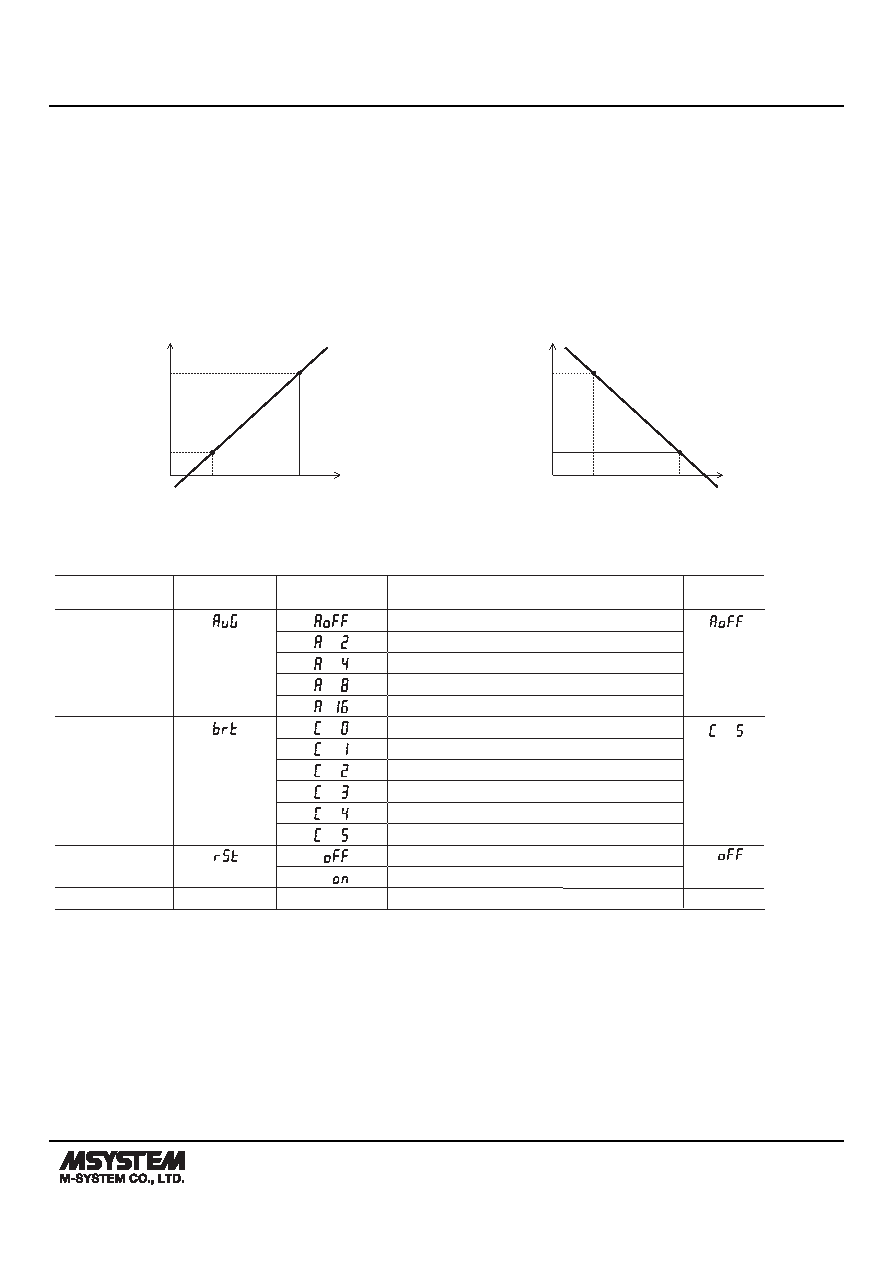 MODEL: 40DCT 40DCT SPECIFICATIONS ES-9538 Rev.8 Page 5/7 https://www.m-system.co.jp/ • Input scaling Zero and full scale of input range can be re-configured to user's desired value by entering parameters. When initialization of setting is executed, these data is lost and return to the default value. Input Scaling Value A: Input value for zero point (Input scaling value A < Input scaling value B) Enter the value you want to set to zero in the measurement range. Input Scaling Value B: Input value for full scale point Enter the value you want to set to full scale in the measurement range. • Display scaling Display Scaling Value A: Display value for Input Scaling Value A Display Scaling Value B: Display value for Input Scaling Value B • Normal Scaling The display value increases when the input signal increases. • Inverted Scaling The display value decreases when the input signal increases. A A B B Display Zero Full Scale Input Input Scaling Display Scaling B A B A Display Full Scale Zero Input Input Scaling Display Scaling Decimal point position: Decimal point position is specified independently from the scaling. When you set the display scaling, include zeros for fractions. ■ DISPLAY SETTING MODE PARAMETER ITEM DISPLAY DISPLAY FUNCTION Moving Average No moving averaging Moving average with 2 samples Moving average with 4 samples Moving average with 8 samples Moving average with 16 samples Brightness Brightness level 0 (dark) Brightness level 1 Brightness level 2 Brightness level 3 Brightness level 4 Brightness level 5 (bright) Initialization Non-initialization Initialize settings (change to factory settings) *1 Version Indication – – Version number, indication only *1. While “on” is shown, pressing Shift button initializes settings. When initialization of setting is executed, existing each parameter setings are lost and return to default value. Be aware that settings does not return to the ex-factory settings specied by /SET option. − DEFAULT VALUE |
|
|
Link URL |
| Does ALLDATASHEET help your business so far? [ DONATE ] |
About Alldatasheet | Advertisement | Contact us | Privacy Policy | Link to Datasheet | Link Exchange | Manufacturer List All Rights Reserved©Alldatasheet.com |
| Russian : Alldatasheetru.com | Korean : Alldatasheet.co.kr | Spanish : Alldatasheet.es | French : Alldatasheet.fr | Italian : Alldatasheetit.com Portuguese : Alldatasheetpt.com | Polish : Alldatasheet.pl | Vietnamese : Alldatasheet.vn Indian : Alldatasheet.in | Mexican : Alldatasheet.com.mx | British : Alldatasheet.co.uk | New Zealand : Alldatasheet.co.nz |
|
Family Site : ic2ic.com |
icmetro.com |
 New Zealand ▼
 English
 Chinese
 German
 Japanese
 Russian
 Korean
 Spanish
 French
 Italian
 Portuguese
 Polish
 Vietnamese
 Indian
 Mexican
 British
 New Zealand