 |
Electronic Components Datasheet Search |
|
|
Electronic Components Datasheet Search |
|
301201 Datasheet(PDF) 3 Page - Tyco Electronics |
|
|
|||||||||||||||||||||||||||||
301201 Datasheet(HTML) 3 Page - Tyco Electronics |
|
|
3 / 9 page 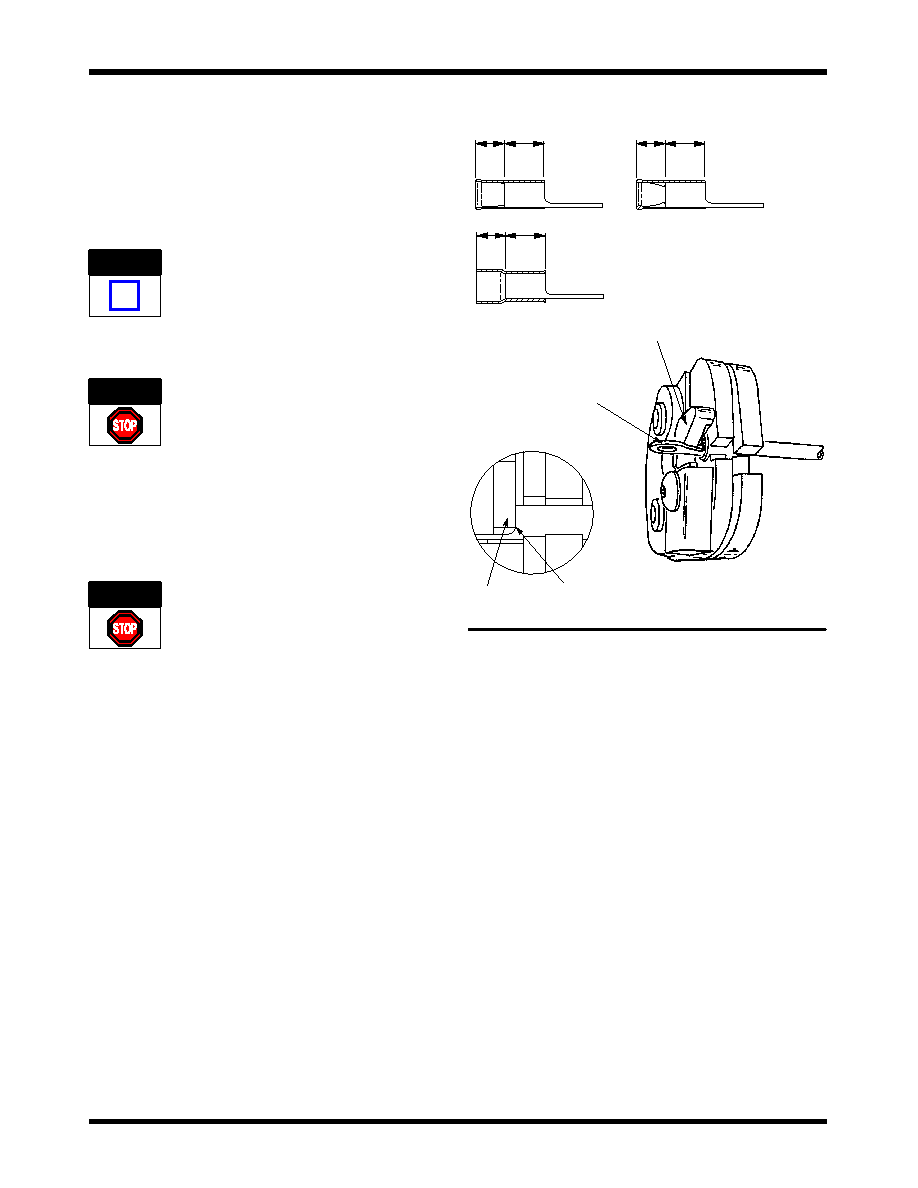 408- 10029 PIDG and PLASTI- GRIP Terminal and Splice Crimping Heads 3 of 9 Rev B Tyco Electronics Corporation 1. Remove quick pins from the adapter assembly. Refer toFigure1. 2. Insert crimping head into the adapter assembly. 3. After the crimping head is properly aligned, insert the quick pins through the two holes in the adapter and through the holes in the crimp head. The quick pins will “snap” into position when they are properly inserted. 3.3. Removal To avoid personal injury, ALWAYS disconnect the battery from the tool before removing crimping head. Remove the quick pins from the crimping head; then remove the crimping head from the tool holder. 4. CRIMPING PROCEDURES To avoid personal injury, ALWAYS keep fingers clear of crimping jaws when operating the tool. Never place anything within the crimping jaws except Tyco Electronics terminals or splices. 4.1. Terminal Crimping Procedure 1. Strip wire to dimensions shown in Figure 2. DO NOT nick wire strand or use wires with nicked or missing conductor strands. 2. Center the terminal or splice wire barrel in the appropriate crimp chamber. See Figure 3. 3. Depress the trigger to advance the moving ram. This closes the crimp jaws in order to hold the terminal in place. DO NOT deform the wire barrel. 4. Insert stripped wire into terminal until the end of the conductor butts against the locator as shown in Figure 3. 5. Activate the tool to complete the crimp. The crimp tool automatically returns to the first position of the cycle when the crimp is complete. 6. Refer to Section 5 and Figure 6 for crimp inspection. Figure 3 PIDG and PLASTI--GRIP Terminals “C” “B” “C” “B” “C” “B” PIDG Terminal PIDG Nylon Insulation Restricting Terminal PLASTI--GRIP Terminal “B” Equals Wire Barrel “C” Equals Insulation Barrel Terminal Tongue Positioned Under Locator Locator Locator Wire Barrel Against Locator 4.2. Butt Splice Crimping Procedure 1. Strip wire to dimensions shown in Figure 2. DO NOT nick wire strand or use wires with nicked or missing conductor strands. 2. Position splice between crimping jaws so that the window indent slides under the locator of crimp head. See Figure 4A. 3. Depress the trigger to advance the moving ram. This closes the crimp jaws to hold the terminal in place. DO NOT deform the wire barrel. 4. Insert stripped wire into wire barrel of splice until the end of the conductor is against the splice wire stop. See Figure 4A. 5. Activate tool to complete the crimp. 6. To crimp the other half of the butt splice, reposition it in the crimping jaws and repeat Steps 1 through 5. If the splice cannot be turned, rotate crimping head. See Figure 4B. NOTE i DANGER DANGER |
|
|
Link URL |
| Does ALLDATASHEET help your business so far? [ DONATE ] |
About Alldatasheet | Advertisement | Contact us | Privacy Policy | Link to Datasheet | Link Exchange | Manufacturer List All Rights Reserved©Alldatasheet.com |
| Russian : Alldatasheetru.com | Korean : Alldatasheet.co.kr | Spanish : Alldatasheet.es | French : Alldatasheet.fr | Italian : Alldatasheetit.com Portuguese : Alldatasheetpt.com | Polish : Alldatasheet.pl | Vietnamese : Alldatasheet.vn Indian : Alldatasheet.in | Mexican : Alldatasheet.com.mx | British : Alldatasheet.co.uk | New Zealand : Alldatasheet.co.nz |
|
Family Site : ic2ic.com |
icmetro.com |
 New Zealand ▼
 English
 Chinese
 German
 Japanese
 Russian
 Korean
 Spanish
 French
 Italian
 Portuguese
 Polish
 Vietnamese
 Indian
 Mexican
 British
 New Zealand


